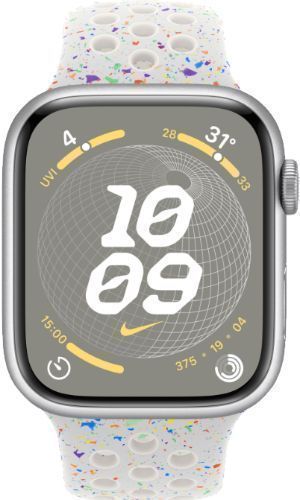
An Apple Watch is one of the few gadgets people genuinely stop wearing once the novelty fades, which is why the second-hand market is full of lightly-used examples at a fraction of retail. That is good news for a buyer. It is also why private-market listings are hit and miss: one person's nearly-new Series 7 is another person's scratched, battery-tired Series 3. The checks below remove most of that risk, whether the watch is for yourself, for a child's first smartwatch, or as a gift.
Which Apple Watch series should you shop?
Models fall into three rough tiers, and deciding which tier you want stops you overpaying for an old flagship or under-buying a current one.
- Series 4 and 5 are the entry line. The larger 40 and 44mm case design arrived on Series 4, and the always-on display arrived on Series 5. Their prices have dropped far enough that they make sense if you mainly want timekeeping, notifications and activity tracking.
- SE, Series 6 and Series 7 are the sweet spot. SE models keep the modern case and a quick processor while skipping the always-on display; Series 6 added the blood oxygen sensor; Series 7 widened the display and added faster charging. For most buyers this band is where value and features meet.
- Series 8 and newer, plus Ultra, are the recent line. The newest series add brighter displays and new gesture controls, and Ultra is the rugged 49mm model built for sport. Refurbs of these are scarcer and cost more, but they will stay on new releases of watchOS the longest.
Series 3 and older are best left alone: they fell off watchOS support some time ago, and pairing with a current iPhone only gets harder from there.
One thing matters more than the tier: whether the watch still receives watchOS updates. A watch stuck on an old release slowly loses pairing support for newer iPhones, so before paying for any used model, check its newest supported watchOS version on Apple's watchOS page. If the listing does not clearly say which series it is, our Apple Watch buying guide walks through the generations and shows how to identify a model from the watch itself.
What should you check before you pay for a used watch?
- Activation Lock first. A watch can be tied to its previous owner's Apple Account. If it is still locked it is close to unusable, and clearing the lock depends on that owner being available. The owner should unpair it from their iPhone, which removes the lock — our guide on removing Activation Lock before a sale or trade-in covers the exact steps. Never pay for a watch that is still locked to a stranger's account.
- Battery condition. The battery is the one part of a watch that genuinely wears, and it is cheap to inspect but expensive to replace. Ask the seller what the watch reports for battery life and battery health, and treat vague answers as a warning sign. A watch with a worn battery is a service job waiting to happen, and that should already be reflected in the asking price. The same logic applies as for phones: see How to Check Battery Health Before Buying a Used iPhone.
- The condition grade. A written grade from a proper refurbisher beats any private seller's adjectives. At EcoLoop every watch is tested and graded in Auckland, and the grade it earned is printed on the listing; the condition guide explains the wording, and What Do Good, Very Good and Like New Actually Mean? goes deeper into how grading protects you.
- Case size. Watches come in a smaller and a larger case size for each series (Ultra is 49mm), and band compatibility follows Apple's small/large band groups — check the band size on Apple's band compatibility page or the product listing before reusing an old band.
- Water resistance. Series 2 and later are designed for swimming, but the seals age with wear, so treat an older watch's swim-worthiness with caution — and keep any watch, new or used, out of saunas and high-pressure water.
Should you buy GPS or cellular?
Cellular models can call and stream without your phone nearby, but they only earn their keep if you genuinely run, cycle or walk the dog phone-free — and they need a monthly plan add-on from a carrier that supports Apple Watch. The main NZ carriers do support it, but confirm the plan details with yours before buying. If your phone is almost always in your pocket or on the kitchen bench, a GPS-only model is simpler, cheaper to buy and one less bill line to manage. When the day comes to move on, an Apple Watch is welcome in the trade-in service, and Smartwatch Trade-In in NZ explains what affects a quote.
What protection comes with a refurbished Apple Watch in NZ?
This is where a refurbisher beats a private marketplace listing. Every watch at EcoLoop is tested and graded in Auckland before listing, ships with free NZ-wide delivery, and is backed by a 12-month warranty for faults plus a 15-day change-of-mind window if the watch simply is not right for your wrist. Practical details live on the returns page and in the store FAQ, and your consumer rights do not shrink just because a device is second-hand — Consumer Protection NZ explains them in plain language. Stock is whatever the market returned this quarter, so prices move as inventory turns over; see current prices on the smartwatches collection.
The watch that suits most people is a recent SE, Series 6 or Series 7 in the size that fits your wrist — GPS unless you regularly go phone-free, cellular if you do. Check the lock, check the battery, check the grade, and the second-hand market's most overlooked bargain becomes a genuinely safe buy.
In stock now: Apple Watches
Live prices from our current stock — updated automatically. Every device includes a 12-month warranty and free NZ-wide shipping.
- Apple Watch Series 7 — from NZ$232.00
- Apple Watch Series 8 — from NZ$276.00
- Apple Watch Series 9 — from NZ$332.00
- Apple Watch Series 10 — from NZ$522.00