Why do Dell Latitude and Lenovo ThinkPad come up so often when you shop refurbished?
Open nearly any refurbished laptop listing in New Zealand and two names dominate the shelf: Dell Latitude and Lenovo ThinkPad. That is not marketing; it is what falls off corporate leases. Large employers deploy these two families by the hundred, run them on service contracts, and release them in bulk when the contracts end. Refurbishers buy those returns, test them and pass them on, which is why both families make up the backbone of the laptop collection for the same reason they made up the backbone of the office desk.
That makes Latitude versus ThinkPad a genuine shopping question rather than a brand argument. If you are buying a refurbished laptop for work or study, there is a good chance you will shortlist one of each before you pay. The useful way to settle it is to compare the things that change your daily experience and the machine's working life, not the logo on the lid.
Are Latitude and ThinkPad actually different kinds of machines?
Both names are families, not single models, and the class inside the family matters far more than the family itself. Dell splits the Latitude into 3000, 5000 and 7000 classes, with the 3000 as the value line and the 7000 getting lighter builds, better screens and longer support. Lenovo splits the ThinkPad into the entry-level E series, the volume T series, and the thinner, lighter X and X1 lines at the top. Our Latitude model-number explainer walks through how to read Dell's digits, and the same skill applies to ThinkPad generation labels.
In practical terms this means an E-series ThinkPad and a 7000-class Latitude are different products wearing similar labels, while a 5000-class Latitude and a current T-series ThinkPad are close rivals. The fair comparison is always class against class. A listing that tells you only "Dell Latitude" or "Lenovo ThinkPad" is asking you to buy blind, so look for the full model number and treat a seller who cannot supply one as a warning sign.
What the two families genuinely share is their origin. Both are designed for fleet life, which usually means a stiffer chassis than a consumer machine at the same money, a keyboard built for millions of keystrokes, and spare parts and firmware supported for years after the machine leaves the shop. That shared design brief is the main reason a business laptop of a few years ago can still be a smarter buy than a new consumer model, whichever badge you end up with.
Which has the better keyboard, screen and day-to-day feel?
This is where buyers argue the loudest, and the honest answer is that both families are excellent at the top and uneven at the bottom.
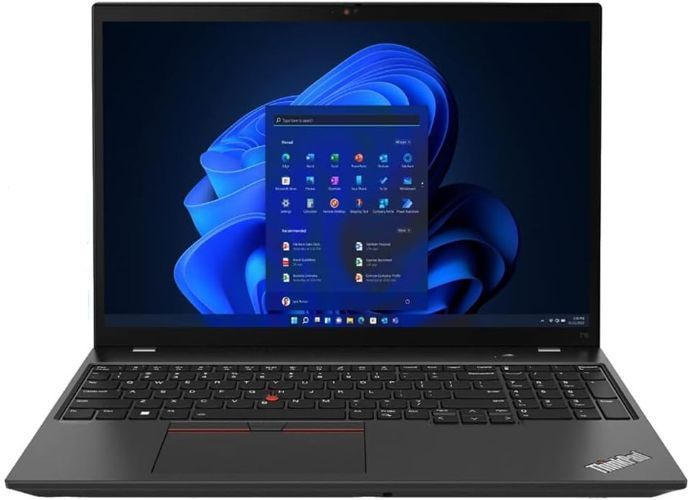
ThinkPad keyboards carry a real reputation for depth and feel, and the red TrackPoint nub between the keys has loyal fans who refuse machines without it. Latitude keyboards are well liked too, and people who want a plain touchpad-and-keys machine rarely feel shortchanged. If you type all day, both families will keep you happy at their upper classes; at the entry classes, quality varies more by model year than by brand.
Screens follow price and generation, not brand. The same family spans dim, washed-out panels and bright, sharp ones, so ignore the family name and read the panel spec on the listing. Aim for 1920 x 1080 or better, and treat a listing that does not state resolution as most likely the cheaper panel. If colour-sensitive work matters to you, that is a reason to compare specific machines rather than brands.
Weight and shape cut across the comparison too. A thicker fifteen-inch Latitude from an older generation and a slim fourteen-inch ThinkPad from a current one are different objects even when the specs on paper match. Decide what you will actually carry before you compare processors, because the family name tells you almost nothing about how heavy the bag will feel.
Which one is easier to keep running over the years?
This is the question refurbished buyers should care about most, because staying running is where a refurbished laptop either pays off or quietly disappoints.
On that measure both families are strong for the same reason: fleets bought them in enormous numbers, so the second-parts market is thick for both. Keyboards, batteries, screens, docks and chargers circulate constantly, and most models in both families accept standard M.2 drives, which makes a storage upgrade a screwdriver job rather than a special order. Neither brand leaves you hunting for a discontinued proprietary battery the way an abandoned consumer model would.
A few practical differences are worth knowing. Dell's naming is tidy, and the class is visible right in the model number, which makes listings easy to read once you know the pattern. ThinkPad generations are equally plain to read, and the business line has kept dock and charger conventions stable across long stretches of model years, which is why second-hand docks are so easy to find. On recent models in both families, charging has moved to USB-C, meaning a common phone charger can often top either one up in a pinch.
If you are buying for an office of more than one person, standardisation is the real lever: one family buys you one dock shape, one charger and one set of instructions, and mixed fleets are what quietly drain a small support budget. If you are buying one machine for yourself, either family can be kept running for years with ordinary parts, so let the specific listing win.
What should you check on either one before you pay?
Brand comparison matters less than listing inspection. Before money changes hands, run the same checks whichever badge is on the lid; our second-hand laptop checklist covers the full sequence, and the short version is this.
Get the condition grade in writing, and understand what it covers. Grading describes cosmetics, while function is a separate question answered by testing; ours is explained plainly in the condition guide, and every device is tested and graded in Auckland before it is listed. Ask any seller what their testing actually includes.
Check the battery. Ask for the cycle count and whatever health figure the seller publishes, and remember that a fleet laptop that lived on a desk and a cable often has a healthier battery than a consumer machine dragged out every day. Confirm the machine has been wiped and signed out of its accounts, because a laptop still locked to a work account is a problem you inherit. Then look at port wear, the hinge and the keyboard, and read the seller's actual terms. At EcoLoop that means a 12-month warranty, a 15-day change-of-mind window and free NZ-wide delivery, and the FAQ spells out the details. Buying from a trader in New Zealand also comes with basics you can read directly at Consumer Protection, so know them before you rely on them.
So which one should you actually buy?
Answer with a class, not a brand. For everyday office work and study, a 5000-class Latitude or a current T-series ThinkPad with 16GB of memory and a solid-state drive is the sweet spot in both lineups. If the machine is carried everywhere, look at the 7000 class and the ThinkPad X line, where both makers spent their lightweight effort. If it will sit on one desk and only move for meetings, an older heavier unit in the same classes is the value play.
Then compare your two best listings directly, on grade, battery report, screen and specs, and buy the better specific machine even if it carries the badge you did not plan for. The two families are close enough at equal class that a better listing beats a preferred logo almost every time. You can see what is on each side of the fence right now in the Dell laptop collection and the wider laptop collection, and if an old machine is funding the upgrade, the trade-in page explains what moves a quote: the exact model, the condition, and how well the machine was prepared before it went.